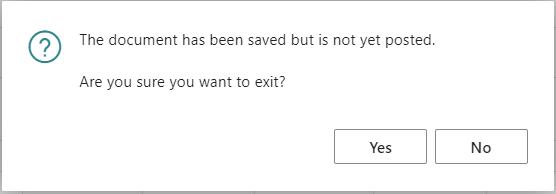
If you are seeing the message “The document has been saved but is not yet posted. Are you sure you want to exit?” in Microsoft Business Central, it’s one of the most common system warnings users run into when working with documents. In this quick guide, we’ll show you what causes it and how to reduce or remove similar warning prompts where possible.
Why This Warning Appears in Business Central
Business Central displays this message to stop users from leaving a document before posting it. It’s a safeguard to help avoid skipping the final processing step, but often users don’t post immediately. There may be approvals required, future invoices entered, or other reasons to delay posting. Because people often don’t post immediately, the warning can be just a hassle to click away every time you leave a document.
Can You Turn Off This Warning?
Yes! You can turn off various warnings, making your experience smoother and less distracting. This helps you focus on important tasks and reduces constant notifications. By adjusting these settings, you can create a work environment that suits your preferences and boosts your productivity. These changes apply only to your user profile and do not affect others in your organization.
Steps to Turn off “The document has been saved but is not yet posted.”
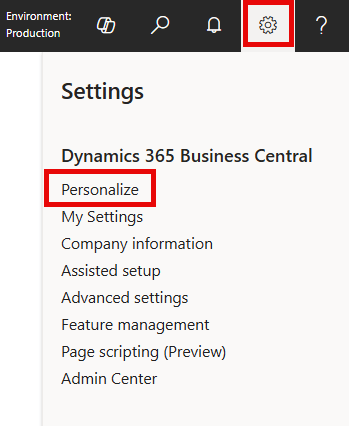
- Select the settings gear icon in the top right of Business Central
- Click ‘My Settings’
- Under the ‘Notifications’ section click the blue hyperlink that says ‘Change when I receive notifications.’
- Locate the notification captioned ‘Warn about unposted documents’ and uncheck the enabled field
- That’s it 😊
Related Articles
- How to Remove the “Get Started” Banner in Business Central: This is a splash page on the role center that users often want to remove. The article explains how to do it.
- How to turn off Business Central Teaching Tips: This popup shows basic help text about software features and can be annoying for regular users. Read this post to learn how to disable it.
- Business Central User Profiles (Roles) and Field Level Security: Discover how to simplify the screen and button layout for user groups in your organization, ensuring a consistent and tidy system.
- How to Use “Edit in Excel” in Business Central (Step-by-Step Guide): Learn how to use Excel to load documents and journals for easier processing. One of the best features Business Central has to offer.
Thank you for reading, I hope you learned something new.
As always, stay SAASY my friend.
-Dino


Leave a Reply