In Microsoft Business Central, this error happens when posting to a Fixed Asset using the Use Duplication List feature from different areas. We will look at where the error occurs, why it happens, and how to fix it. This is usually due to recently creating a new Depreciation Book but missing a setup.
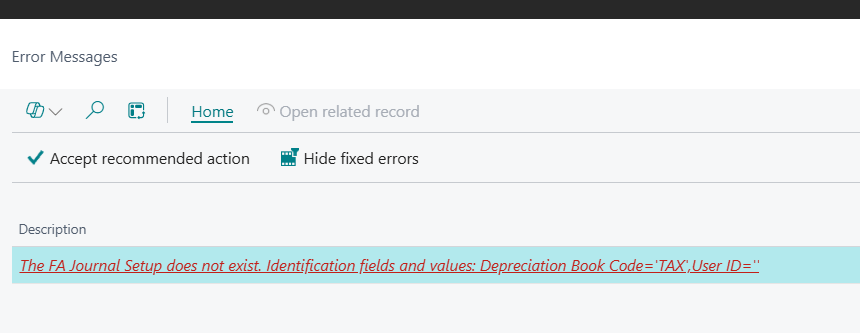
Why and Where is the FA Journal Setup Error Thrown?
Companies often maintain several depreciation books to comply with different financial, tax, and regulatory requirements. Each book may apply various depreciation methods and asset useful lifes. When posting a Fixed Asset transaction, selecting the Use Duplication List option automatically generates journal lines for additional depreciation books, streamlining the process. An error may occur if the Depreciation Book you’re copying to doesn’t have a journal setup, meaning Business Central is unable to create the necessary extra journals. Below are the potential errors related to this missing setup.
- The FA Journal Setup does not exist. Identification fields and values: Depreciation Book Code=XXXX, User ID — This error occurs when posting a Fixed Asset G/L Journal with the Use Duplicate List selected, the Duplicate in Depreciation Book field filled, or when posting from a Purchase Invoice.
- FA Jnl. Batch Name must be filled in FA Journal Setup: Depreciation Book Code=XXXX, User ID=. It cannot be zero or empty. — Same processes as the above error, except this occurs if the setup existed at one point but was then deleted.
- FA Jnl. Template Name must have a value in FA Journal Setup: Depreciation Book Code=XXXX, User ID=. It cannot be zero or empty. — This occurs when trying to run the Calculate Depreciation batch job.
Steps to Resolve the Error
- Open the Depreciation Book causing the error
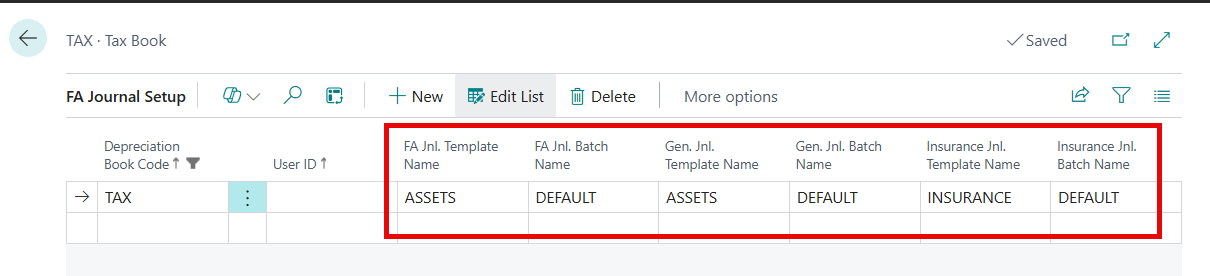
- Select the Related button, then Depr. Book, and finally FA Journal Setup (Pictured below)
- Fill in all of the journal template and batch name fields to resolve all errors stated above. Checkout the video below where I walk through adding those setups.
- That’s it!! You should be good to go now 😊
Thank you for reading, I hope you learned something new.
As always, stay SAASY my friend.
-Dino
 Business Central Made Easy
Leave a comment