In Business Central, this code is for both Customer and Vendor records. You can set default terms for each master record, which are used in related documents. The code defaults to new documents but can be changed if necessary.
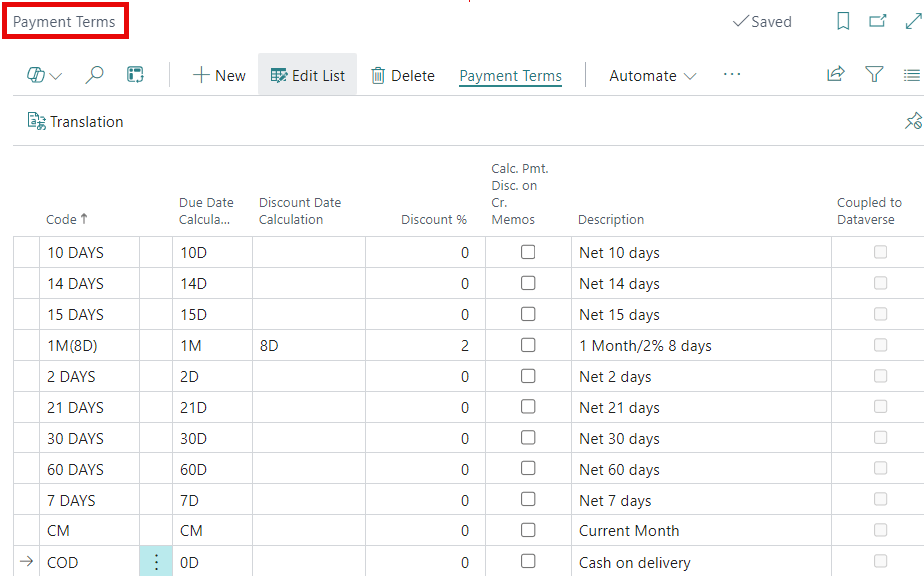
Field Definitions
- Code: An alphanumeric field of up to 10 characters, typically named clearly in relation to the terms.
- Due Date Calculation: A formula that calculates the Due Date by adding a specified period to the Document Date. For example, 30D means 30 days; if the Document Date is 4/1/2024, the Due Date would be 5/1/2024.
- Discount Date Calculation: This calculates the latest date customers can receive a discount for early payment. It uses a similar formula to the Due Date Calculation and is based on the Document Date.
- Discount %: This is the percentage discount a customer receives if they pay by, or on, the Discount Date.
- Calc. Pmt. Disc. on Cr. Memos: This determines if the Discount Percentage is calculated when processing a Credit Memo.
- Description: I think you can handle this one. 😏
- Coupled to Dataverse: Shows if a Business Central record is linked to a Microsoft Dataverse record, useful for software integration.
Video Breakdown
The Payment Terms Code, Due Date, Payment Discount %, and Payment Discount Date can be individually changed per document, despite their default settings from the Customer Card.
Thank you for reading, I hope you learned something new.
As always, stay SAASY my friend.
-Dino
 Business Central Made Easy
Leave a comment